Open search from any workspace
Click Search your clinic in the dashboard navbar, or press Command+K on a Mac and Control+K on Windows or Linux. On a small screen, tap the search icon. You can stay on Billing, Calendar or any other workspace while you search.
- Enter at least two characters: a name, patient ID, record title or reference number.
- Choose a category to narrow the results, or keep Everything selected.
- Click a result to open the exact record. You can also use the up and down arrow keys, then Enter. Escape closes search.
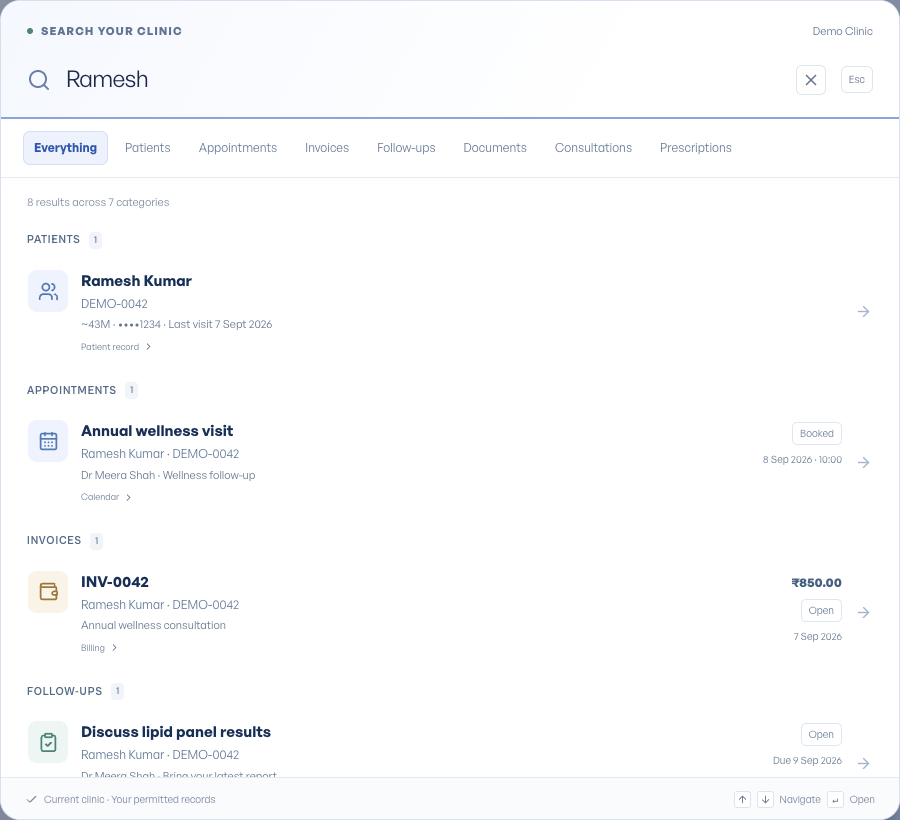
Search the details you already know
Patients: search by name, patient number or at least three digits of a mobile number. Close spelling matches and previous identities from merged charts can help you find the retained patient. Check age, sex, mobile ending and last visit to distinguish people with similar names.
Appointments: try a doctor, service, reason, patient or date such as 2026-09-08. Invoices also match service descriptions and recorded payment references. Follow-ups match their task and patient instructions, including closed tasks.
Documents match titles and file details. Consultations match note text, while prescriptions match medicines and instructions. A query such as a patient name and medicine can help narrow a prescription search.
Document search does not read words inside scanned images or PDF files. Opening a document does not mark it reviewed or release it to the patient.
Read the result before opening it
Results are grouped by record type and show the patient, source, date and status where available. Invoice results include the invoice total. Everything previews up to five matches per category. Choose All patients, another matching category, or its filter to see more; Show more loads the next page.
An appointment opens its own overview with the patient, time, status and next action. Use Calendar in the visit navigation to return to its date. A prescription opens at the prescription section of its consultation. Follow-ups and documents open their own detail pages.
Your current clinic and permissions
Search uses the clinic selected in your navbar. It never combines records from different clinics. The categories you see depend on your access: an administrative owner does not gain clinical notes, and a doctor without billing access does not receive invoice results.
Searches are not saved as a browser history or a recent-search list. If clinic access changes or a request fails, refresh the page or use Retry search as shown.
Narrow down an ambiguous search
If a name produces many results, try the patient number or part of their mobile number. For example, search the last four digits you have confirmed with the patient, then compare the identifying details in the result. A shared family number can legitimately return several people.
If you know the patient but need a particular record, use the matching category. Choose Appointments for a visit, Invoices for a charge, or Documents for an uploaded file. Searching a document title is more useful than searching a sentence that only appears inside its scan.
No results can mean that the record is in another clinic or that your role cannot access that category. Check the selected clinic and try a shorter query before creating a new patient.