Skip to content
Explore the workspace

Billing & collections

Clinic billing, from invoice to receipt.

Add services to a patient’s invoice, record payments and refunds, and see what remains outstanding. Print the documents or export daily collections to check against your clinic’s records.

Demo & early access · Built for outpatient clinics

Illustrative clinic data

Build an invoice from clinic services

Organise services into groups with an optional base price and separately priced additions, or use individual service prices. Add only the services provided to the patient’s invoice. Review line items, quantities, discounts and the final amount before recording a collection.

  • Service groups, base charges and separately priced additions
  • Patient-linked invoice line items
  • Printable invoice and payment documents
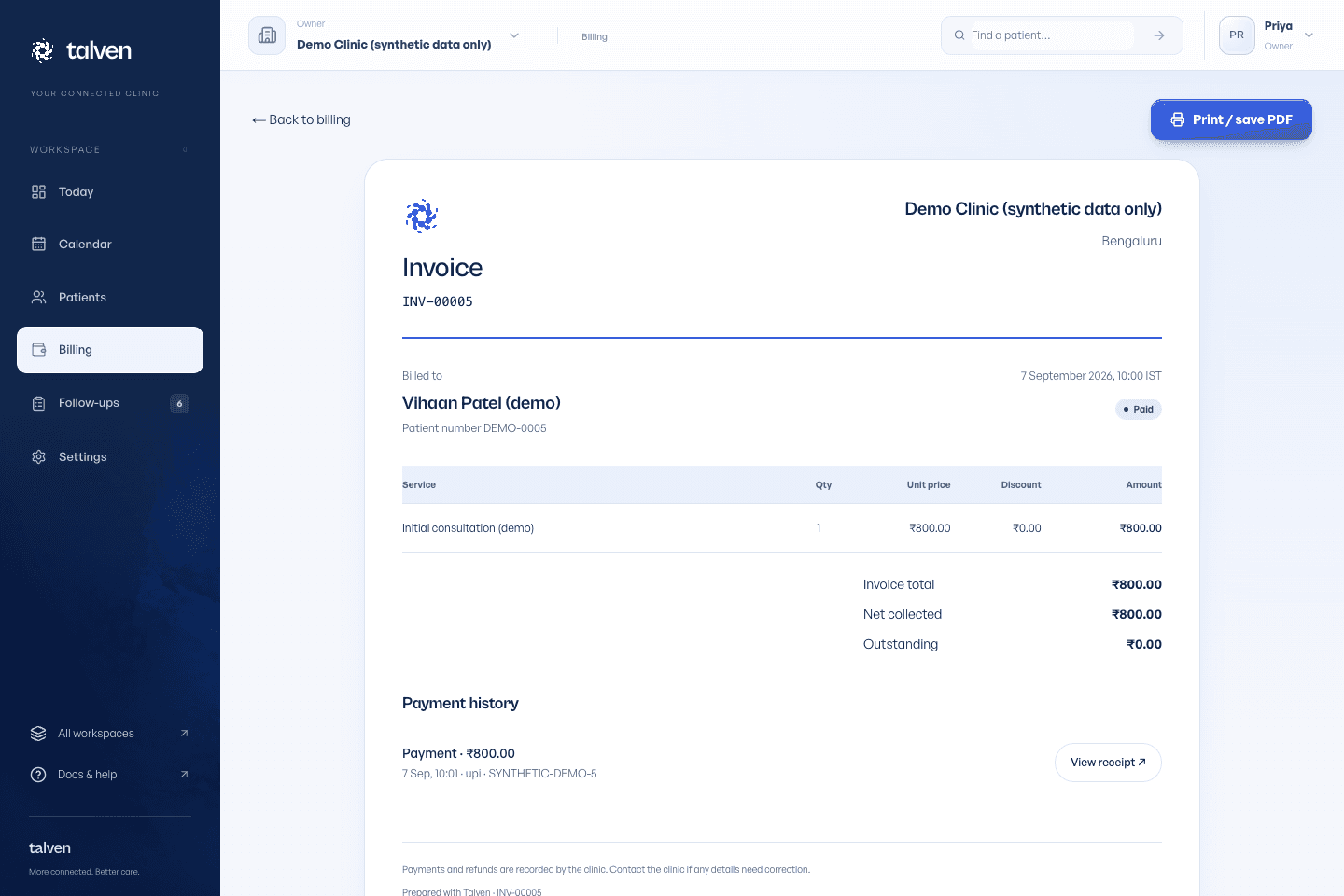
Inside TalvenDEMO CLINIC
Talven invoice with patient details, line items, totals and payment history
Invoice and payment history in one document. Demonstration data; no money collected.

Record what actually happened

Staff can record a cash, UPI or card payment after confirming receipt through the clinic's usual process. The entry is a record, not a payment gateway transaction or bank reconciliation. Partial payments and refunds need the same care as the original collection.

Recorded payment method and amount

Outstanding balance after recorded collections

Payment and refund history

See how records and access work

Close the day with a reconciliation

Use the collections export to compare the application's entries with cash on hand and the clinic's bank or payment records. Investigate differences rather than changing clinical history. Confirm tax and accounting requirements separately with the clinic's adviser.

  • Daily collection CSV export
  • Role-based access to billing work
  • Reconciliation against your clinic’s cash and bank records
From the help center

Create invoices and print documents

Record charges, payments and refunds with a clear history.

Read the guide

EVALUATE IT FOR YOUR CLINIC

Reconcile a sample day at the desk.

Use your own working day as the test. Start with fictional records, then decide what fits.

Who it fits

For clinics billing consultations and additional services, recording money received and keeping patient balances visible. Owners and authorised reception staff can work from the same invoice and payment history.

Where the scope stops

Recording UPI or card as a payment method does not process or verify a bank transaction. Talven does not replace pharmacy inventory, a full accounting package or tax filing. Confirm invoice and tax requirements with your adviser.

Before your demo

  • List individual services or service groups. A group can have a base amount plus priced additions, or no base amount with charges on the individual services.
  • Decide who records collections and refunds, and how receipt of cash, UPI and card payments will be confirmed outside the app.
  • Prepare a fictional invoice, a partial payment and a refund scenario. Agree who will compare the collections export with cash and bank records.
Read the setup guide

What to try together

  1. Build a grouped bill

    For example, use a ₹500 base consultation and a ₹200 additional service. Check that the ₹700 sample bill includes only services actually selected. These are illustrative clinic fees, not Talven prices.

  2. Record a partial collection

    Record a fictional ₹300 against that ₹700 bill. Confirm the remaining ₹400 balance, payment method and printable receipt.

  3. Inspect a refund

    Use a permitted refund scenario and inspect its history. Confirm what remains collected and what the patient is still owed or needs to pay.

  4. Check the daily export

    Download the collections CSV and compare its entries with your sample cash and payment records. A recorded collection alone is not proof of bank settlement.

PRICING & EARLY ACCESS

Know the scope. Get a written quote.

Talven is in demo and early access. Subscription prices have not been published.

Describe your services, staff access, invoice requirements and current accounting process. Ask which setup and support are included and whether anything you need falls outside the current billing scope.

Plans & early access
Request a clinic demo

Frequently asked questions

Ask us a question
Does Talven collect UPI payments?

Talven records a payment marked as UPI after the clinic confirms receipt. It does not currently process or verify the bank transaction.

Is this a complete accounting or pharmacy system?

No. The current billing scope is clinic service invoices and recorded collections. Pharmacy inventory, full accounting and tax filing should be evaluated separately.

ONE WORKSPACE. FROM FIRST VISIT TO FOLLOW-UP.

Let care
come together.

Request demo access

Currently in demo.
No payment required to apply.